
Camo by Reincubate: Creating Professional-Quality Videos

Available on Windows PCs, Camo by Reincubate is an app that enables customers to utilize cameras they already own to create incredible videos.

Whether they’re meeting virtually or recording themselves, users can create professional videos using Camo’s AI-enabled video enhancements. It establishes a fast, stable connection with a user’s PC, enabling them to record themselves with a higher-quality camera that feeds directly into their computer.

Follow this training to discover how Camo supports users, how it's differentiated from other apps, and which customers can benefit from webcam software.
How Does Camo Work?

Camo runs AI-driven video enhancements on the NPU, freeing up the CPU and GPU for other tasks. By offloading work onto the NPU, Camo enables dedicated hardware to process AI tasks at a faster speed.

Plus, the NPU is designed to run AI tasks at low power, helping preserve the system's battery life. In addition to preserving battery power, Camo’s AI effects run directly on the user’s computer, not in the cloud or over the internet.

What AI Features Are Available?

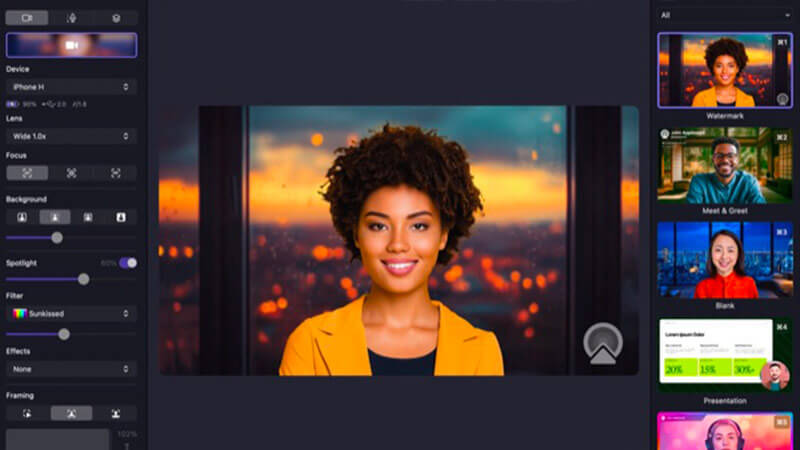
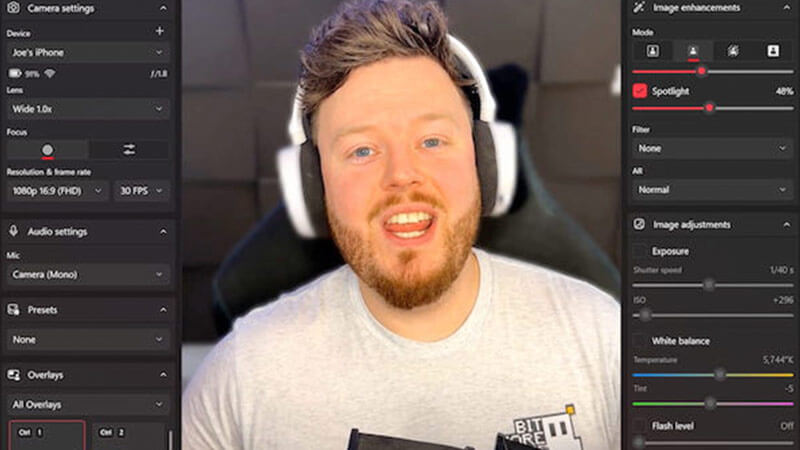
Camo’s webcam software offers a suite of AI-powered video features. These features are designed to enhance recordings, keep users looking professional, and dynamically adapt to their movements and environment.

Auto Framing keeps users perfectly centered in the frame by tracking their face in real time, even as they move around or shift positions.

Virtual Green Screen allows users to replace or blur their background seamlessly, eliminating the need for a physical green screen while keeping the focus on them.

Spotlight Mode dynamically adjusts lighting and focus to ensure users are always well-lit and clearly highlighted, regardless of their environment.

Gesture Recognition & Smart Zoom uses AI to detect users’ movements and gestures, automatically adjusting the camera’s zoom and framing to follow their motions naturally.

What Makes Camo Different?

Camo is different from other software because of how workloads are split across devices. Even though it lets users control videos from their computers, all the heavy processing happens on their phone or tablet, so their PCs don't slow down. With another device handling the processing, users' PCs stay fast and are freed up to handle other workloads.

The app is thoughtfully designed, with full tablet support and a Dark Mode option for easy use in lower lighting environments. It stays current with compatibility for more than 40 popular apps, ensuring seamless integration with users’ workflows. Essentially, Camo works with many preexisting video creation apps, so users don’t have to change apps just to use this software!

Camo avoids the hassle of unreliable drivers, insecure pairing processes, and intrusive ads, and it doesn’t require users to leave ratings in the App Store. Plus, it includes a built-in uninstaller, so removing the app is simple and straightforward.

How Do You Install Camo?

Camo is easy to install with a few simple steps.

  1. Download Camo Studio onto your Windows PC.
  2. Download Camo Camera onto your phone/tablet, or plug a camera into your PC.
  3. Select your device in Camo Studio (Camo Studio will automatically detect your device).

Camo Studio

Camo Studio is the desktop app that you download onto your PC. From your desktop, you can adjust settings like zoom, lighting, and framing to get the perfect video feed from your phone or camera.

Camo Camera

This is the mobile app that runs on your phone. It captures the video and sends it to Camo Studio on your computer so you can use your phone as a high-quality webcam.

Camo Works Across Industries

Camo empowers professionals, educators, creators, and businesses to produce high-quality, engaging videos across a variety of workflows and industries.

Sales & Marketing:

Teams can use Camo to enhance their campaigns and presentations with professional-quality videos, using overlays and HD visuals to communicate their brand message more effectively.

Education:

Teachers and instructors can transform lessons and lectures with Camo, making learning experiences more engaging and impactful for students.

Streaming:

Streamers and content creators can capture every moment in stunning detail using Camo’s AI features to capture themselves better.

Content Creation:

Creators can realize their ideas in new ways, leveraging Camo’s tools to produce polished, creative videos using devices they already own.

Enterprise:

Businesses can use Camo for high-quality video calls across Teams or Zoom, keeping communication professional and consistent without changing existing hardware or workflows.

Summary

Camo by Reincubate is a Windows PC app that lets users turn the cameras they already own into high-quality video tools for virtual meetings, recordings, and streaming.

With AI-driven tools like Smart Zoom, Spotlight Mode, and Virtual Green Screen, Camo helps users look professional without slowing down their computer. Setting up the software is easy, as users can download Camo Studio onto their computer and Camo Camera onto their phone or tablet.

Recommend Camo by Reincubate to professionals, creators, and other users who want to make high-quality, AI-enhanced videos using the cameras they already own.

TAKE THE QUIZ